
Digital-Physical Hybrid Quest: Urban Tech Adventure
The city has two layers—most people only see one.
About This Quest
Blend augmented reality apps with real-world urban exploration to unlock hidden city layers through QR codes, geolocation puzzles, and digital-physical challenges.
Digital-physical hybrid quests merge smartphone technology with ground-level exploration, turning your city into a multi-layered puzzle. You're scanning QR codes hidden on utility boxes, solving AR riddles that overlay historic photos onto modern storefronts, and following GPS coordinates that lead to physical objects containing digital clues. This isn't screen time—it's using tech as a lens to see what's always been there. The mechanics are simple: download location-based apps like Actionbound or Geocaching, then follow trails that ping-pong between digital prompts and physical discoveries. You might decrypt a message using a cipher found on a statue's plaque, then input it into an app that reveals your next waypoint three blocks north. The bridge wall at 5th and Market has a faded mural—scan it with the right filter, and you'll see the artist's original sketch layered over the weathered paint. What makes this work is the tension between pixels and pavement. Apps provide structure and gamification, but the real rewards come from touching the brass railing worn smooth by a century of hands, or noticing the building detail you've walked past a hundred times. The best routes combine historic markers with tech checkpoints, forcing you to look up from your screen to find the physical answer. Start with established trails in your downtown core—they're debugged and balanced for flow—then graduate to creating your own hybrid routes once you understand the rhythm.
Why This Quest Matters
You'll stop seeing your phone as a distraction and start using it as an x-ray machine for cities. The thrill comes from that moment when a faded mural on your screen snaps into focus over the weathered wall in front of you, or when a century-old cornerstone suddenly explains the GPS coordinate blinking on your map. You're not just walking—you're toggling between two versions of the same place, and both become more real.
What You'll Experience
- How to read cities in layers—digital archives overlaid on physical artifacts
- Which apps turn location data into narrative structure
- How to decode architectural palimpsests using tech as your cipher key
- The rhythm of ping-ponging between screen prompts and ground-level discoveries
- How to leave digital breadcrumbs in physical space for future explorers
What You'll Need
Top gear to make this quest great.
Pull it off
Portable Battery Pack (20000mAh minimum)
Running GPS, AR apps, and camera simultaneously drains batteries fast—this keeps your phone alive for 3-4 hour quests without hunting for outlets. The dual ports let you charge while navigating.
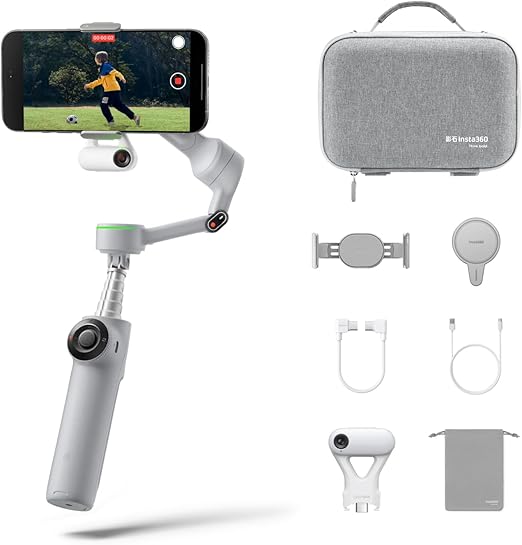
AR overlays and comparison photos require steady shots to work effectively. The gimbal eliminates hand shake when capturing before/after pairs or filming AR reveals, making your documentation shareable-quality.
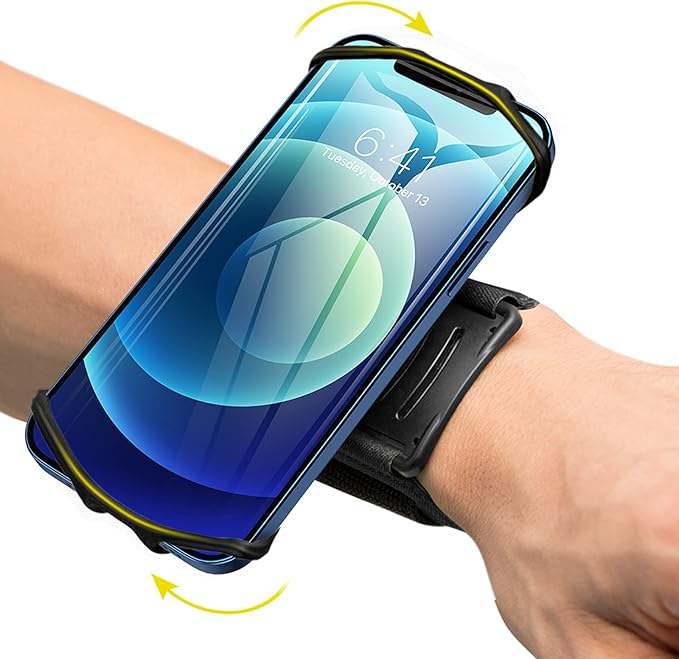
Keeps your phone accessible for constant scanning and checking without juggling or dropping it on concrete. The rain cover means weather doesn't cancel quests. Hands-free during physical climbing or scrambling moments.
As an Amazon Associate I earn from qualifying purchases. Prices may change.
Step-by-Step Guide
Download and test your dual-app toolkit
Install Actionbound for structured quest trails and Geocaching for coordinate hunts. Run a practice loop in your own neighborhood to learn how waypoint unlocking, QR scanning, and GPS tracking work before you commit to a downtown route.
💡 Pro Tips:
- • Test both apps' camera and location permissions before you leave home
- • Download offline maps for your target area in case cell service drops
Scout and map your hybrid loop
Use Google Street View to identify 8-12 waypoints within a 10-block radius—public art, historic plaques, architectural details with physical elements worth examining. Design a flow that alternates between app checkpoints and self-directed stops: app coordinates lead to QR code, physical clue decodes, answer unlocks next location.
💡 Pro Tips:
- • Write waypoint coordinates on paper as backup—apps crash and GPS drifts
- • Note physical landmarks for each checkpoint so you can navigate if tech fails
Layer AR challenges over physical sites
Use Google Lens or urban exploration tools to point your camera at building facades and reveal historic photos, scan plaques to trigger audio stories, or apply filters that highlight hidden architectural details. The AR overlay becomes your lens for reading what's already there.
💡 Pro Tips:
- • Early morning means fewer crowds blocking QR codes and cleaner photo angles
- • Golden hour light makes AR overlays more dramatic against building facades
Connect digital clues to physical evidence
When an app reveals a historic fact, walk the building's perimeter hunting for material proof—cornerstones with dates, bricked-up doorways, changes in brick color showing additions. The screen information becomes the key to decoding the physical text.
💡 Pro Tips:
- • Capture side-by-side shots of AR overlays next to physical reality for your reference library
Build the network for future questers
Use geocaching apps to leave digital notes at physical locations. Hide your own QR codes linking to photo albums or stories about spots you discovered. You're creating feedback loops between layers—digital breadcrumbs in physical space.
💡 Pro Tips:
- • Link your codes to unlisted YouTube videos or Google Photos albums for easy sharing
End where both layers converge
Finish at a spot where the hybrid approach feels inevitable—a museum with AR exhibits, a cafe displaying local history, or a viewpoint where your app's map overlays perfectly onto the vista below. The finale proves the city's two layers were always meant to be read together.
Gear Up for Your Quest
The gear that makes this quest work.
Pull it off

Portable Battery Pack (20000mAh minimum)
Running GPS, AR apps, and camera simultaneously drains batteries fast—this keeps your phone alive for 3-4 hour quests without hunting for outlets. The dual ports let you charge while navigating.
+ complete the kit — 4 more

Offline Map App with Layer Support
EssentialPopularCell dead zones kill GPS-dependent quests. Offline maps with pre-downloaded area tiles and custom waypoint plotting ensure you never lose navigation even when signal drops. Export your route as a backup layer.
Apps like Maps.me or OsmAnd that work without cell service and allow custom waypoint overlays

Smartphone Gimbal Stabilizer
RecommendedAR overlays and comparison photos require steady shots to work effectively. The gimbal eliminates hand shake when capturing before/after pairs or filming AR reveals, making your documentation shareable-quality.
Handheld mechanical stabilizer that smooths out phone camera movement
Get on Amazon · $199.99 — Smartphone Gimbal Stabilizerdetails & deals →
Keeps your phone accessible for constant scanning and checking without juggling or dropping it on concrete. The rain cover means weather doesn't cancel quests. Hands-free during physical climbing or scrambling moments.
Protective case with integrated wrist lanyard and rain cover
Get on Amazon · $15.99 — Weather-Resistant Phone Mount with Wrist Strapdetails & deals →
Clip-on Macro Lens Attachment
OptionalHidden QR codes, worn plaque inscriptions, and architectural micro-details become legible with macro capability. Reveals texture and weathering patterns that tell stories apps can't access.
Small magnifying lens that clips over your smartphone camera for extreme close-ups
Get on Amazon · $39.99 — Clip-on Macro Lens Attachmentdetails & deals →RELATED GEAR GUIDE
Urbex Gear List 2026: The 7 Essentials We Actually Carry
Field-tested picks · Urban Exploration
As an Amazon Associate, IRL Sidequests earns from qualifying purchases at no extra cost to you.
Prices and availability are subject to change. The price shown at checkout on Amazon at the time of purchase will apply.
Editor's Picks
Hand-selected quests our team thinks you'll love

Urban Food & Beverage Culture Quest
The best food in your city isn't on Yelp's front page—it's where rent is cheap and menus aren't in English.

Historical Walking Tour: Read Your City's Hidden Stories
Every sidewalk crack has a story—you just need to know where to look.

Architecture Scavenger Hunt: Decode Your City's Hidden Design Language
That building you pass every day? It's been screaming details at you that you've never noticed.