Desk Reset Rituals for Screen Workers - Personal Growth quest for Beginner level adventurers

Desk Reset Rituals for Screen Workers

Your screen blur isn't age—it's ritual deficit.

Share:
3 supplies needed· Estimated total: Free
View supplies

About This Quest

Structured reset practices for remote workers, coders, and designers to break screen fatigue cycles and reclaim focus.

You've been staring at the same three browser tabs for 90 minutes. Your neck feels like concrete, your eyes like sandpaper, and that Slack notification just made you flinch. Remote work sold us freedom but delivered digital house arrest. This isn't about productivity hacks or standing desks. It's about interrupting the screen-fatigue loop with deliberate sensory resets—micro-practices that pull you out of digital hypnosis. Think of it as hitting Ctrl+Alt+Del on your nervous system. The ritual structure matters more than the duration: you're training your body to recognize when it's time to disengage before the afternoon crash hits. These resets work because they target the specific strain patterns of screen work—forward head posture, accommodative eye stress, and decision fatigue from constant context-switching. You'll cycle through tactile, visual distance, and proprioceptive exercises that reverse the physical compression of desk work. No yoga mat required, no coworkers judging your floor stretches.

Why This Quest Matters

These resets interrupt the screen-fatigue loop before the afternoon crash devours your focus. You're not optimizing productivity—you're preventing the physical and cognitive compression that makes the last three work hours feel like pushing a boulder uphill. The ritual structure trains your body to recognize disengagement cues, turning what feels like willpower into automatic sensory relief.

What You'll Experience

  • How to reverse forward head posture and chest compression in under 5 minutes
  • The specific sensory switches that break digital hypnosis
  • Why deliberate blinking and distance focusing prevent screen-eye burnout
  • How to use proprioceptive and breathing cues to activate parasympathetic recovery
  • The difference between a productivity break and a true nervous system reset
Duration
15-30 minutes
Estimated Cost
Free
Location
Indoor
Season
Year-round
Family Friendly
All ages welcome

Step-by-Step Guide

1

Create a digital perimeter

Close all tabs except one, silence notifications, flip your phone face-down. This reset dies if you're half-monitoring Slack. You're establishing an undistracted 10-minute boundary.

💡 Pro Tips:

  • Announce your break in Slack before closing it—removes the guilt reflex
  • Leave one empty tab open so you're not tempted to 'just check' something
2

Undo the forward hunch

Stand with feet hip-width, knees soft, shoulders back and down. Roll your shoulders backward 5 times to reverse the screen-slump posture. You're physically resetting your skeletal alignment before addressing the rest.

3

Reset your focal distance

Focus on the farthest object visible through a window for 20 seconds—if no window, use the far corner of the room. Blink deliberately 10 times. Screen workers under-blink by 66%, starving eyes of lubrication and distance practice.

💡 Pro Tips:

  • Set a daily calendar reminder for this step alone if dry eyes are chronic
4

Reactivate tactile awareness

Roll a textured object between your palms—therapy ball, golf ball, even a pen. Apply pressure and rotate for 60 seconds. You're waking up mechanoreceptors dulled by hours of keyboard monotony.

5

Open your compressed chest

Place both palms on your desk edge and step back until your torso hits 45 degrees, arms straight. Drop your chest between your shoulders and hold for 30 seconds. Feel the stretch across pecs and front deltoids that curl inward during typing.

6

Recalibrate with contrast breathing

Balance on one foot for 30 seconds (eyes open), then switch—this forces vestibular recalibration after static sitting. Follow with contrast breathing: inhale 4 counts through nose (belly expands), hold 4, exhale 6 through mouth. Repeat 4 cycles. The extended exhale trips your parasympathetic response.

7

Lock in the cognitive shift

Write one sentence by hand describing what you just felt physically. Pen-to-paper engages motor pathways your brain recognizes as different from typing. Before reopening tabs, name the ONE thing you'll tackle next—this is your single focus intention.

💡 Pro Tips:

  • Keep a paper notepad on your desk specifically for these handwritten check-ins
Full gear guide
Journaling & Habit Kit: 10 Picks That Build the Habit
See all picks →

Gear Up for Your Quest

Get everything you need to make this quest amazing.

Textured Therapy Ball (Spiky or Ridged)

Textured Therapy Ball (Spiky or Ridged)

Recommended
$8-12

The texture amplifies tactile feedback to counteract the smooth, uniform feel of keyboards and trackpads. Spiky surfaces activate more nerve endings than smooth objects, creating a stronger sensory interrupt.

2.5-3 inch diameter ball with raised textures (spikes, ridges, or bumps) designed for hand therapy and trigger point work


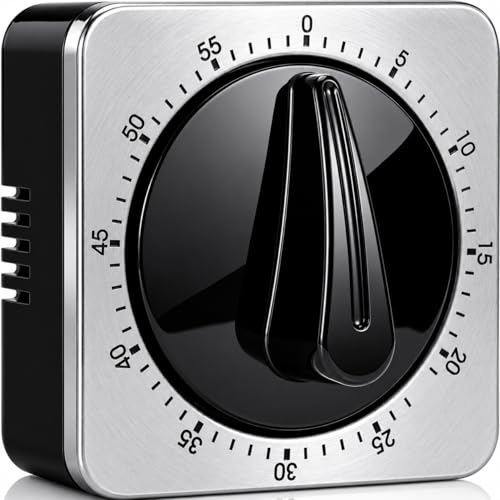
Analog Interval Timer

Analog Interval Timer

Recommended
$12-18

Physical winding action serves as ritual initiation. The ticking provides ambient time awareness without screen-checking. Analog format prevents phone-grab temptation.

Mechanical kitchen timer with audible tick and ring (no digital display)


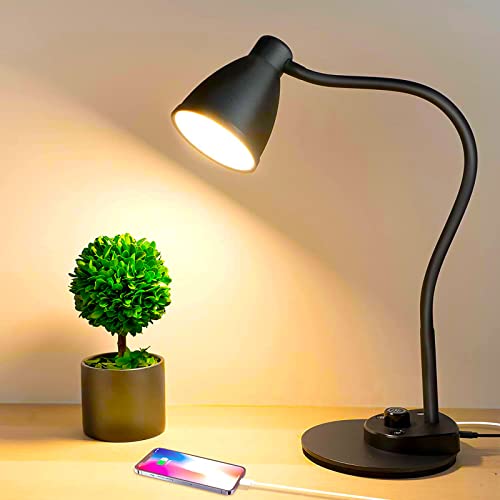
Blue Light Filtering Desk Lamp

Blue Light Filtering Desk Lamp

Optional
$25-45

Provides non-screen light source during breaks, reducing reliance on monitor-based lighting. Warm tones support circadian rhythm regulation for afternoon resets.

Adjustable LED desk lamp with warm color temperature (2700-3000K) and dimming capability

RELATED GEAR GUIDE

Journaling & Habit Kit: 10 Picks That Build the Habit

Field-tested picks · Personal Growth

As an Amazon Associate, IRL Sidequests earns from qualifying purchases at no extra cost to you.

Prices and availability are subject to change. The price shown at checkout on Amazon at the time of purchase will apply.